Recently, there was a performance issue in one of our client's systems and the client asked us to find the root cause. Long time, the system was working fine without raising that much concern. I was curious about what went wrong and how to fix it. So, I spent couple of hours to investigate it. In this article, I am going to explain what actually happened and how I resolved it. Let's start.
Problem Statement
In brief, there are two different processes in the system,
- Producer processes are continuously generating jobs and inserting into a job queue table with unprocessed status.
- Worker processes are competing to pick and update the unprocessed rows with predefined priority basis.
Thus it becomes a typical job queue system. My investigation identified, lots of deadlocking on the job table so, overall performance degrades significantly. I found that, over the period millions of data piled up in the job table and also system load increased. The queries worked fine under low load, however, higher concurrency exposed race conditions and locking conflicts.
Preparing the Playground
Let's create following tables and insert test data in these tables for testing purpose:
- Jobs Table - stores job information, schedule time and priority.
- JobDetails - holds all sub tasks of a job.
-- Job Table
CREATE TABLE [dbo].[JobDetails](
	[details_id] [int] IDENTITY(1,1) NOT NULL,
	[job_id] [int] NULL,
	[details] [varchar](50) NULL,
	[status] [tinyint] NULL,
	[start_time] [datetime] NULL,
 CONSTRAINT [PK_JobDetails] PRIMARY KEY CLUSTERED
(
	[details_id] ASC
)
) ON [PRIMARY]
GO

CREATE NONCLUSTERED INDEX [IX_Jobid] ON [dbo].[JobDetails]
(
	[job_id] ASC
)
INCLUDE([details],[status])  ON [PRIMARY]
GO

CREATE NONCLUSTERED INDEX [IX_status] ON [dbo].[JobDetails]
(
	[status] ASC
) ON [PRIMARY]
GO

ALTER TABLE [dbo].[JobDetails] ADD  CONSTRAINT [DF_JobDetails_status]  DEFAULT ((0)) FOR [status]
GO

-- Sample Jobs
  INSERT INTO [Jobs] (job_name, priority,schedule_time)
  VALUES('Test1',1,'2026-01-12 10:30'),
  ('Test2',2,'2026-01-12 10:45'),
  ('Test3',3,'2026-01-12 10:30'),
  ('Test4',4,'2026-01-12 10:40')

GO

-- Insert 100K sample sub tasks
INSERT INTO [JobDetails]([job_id])
VALUES(CAST (rand()*100 AS INT)%4 + 1)
GO 1000000

UPDATE [JobDetails] set details = 'Details_' + FORMAT(details_id, '000000')

-- Query Listing:-1
How the System Works
The producer threads simply add the jobs in the job tables (you already setup the ground in Query Listing:-1). Now, explain about the working process of a worker thread. A worker thread:
- Step-1: books some jobs for him by updating top N jobs of the table and set to a temporary status (negative value of its worker id).
- Step-2: selects them for processing.
- Finally: marks the job status as completed.
Recreating the Scenario
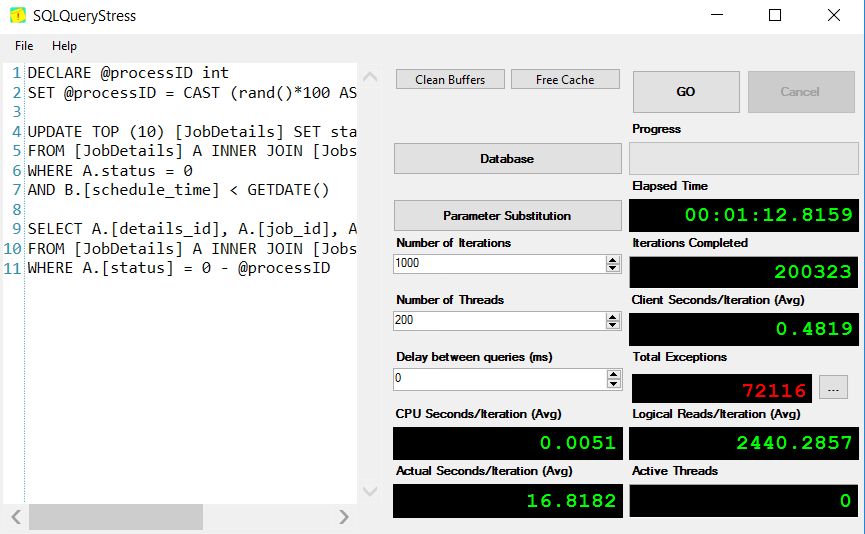
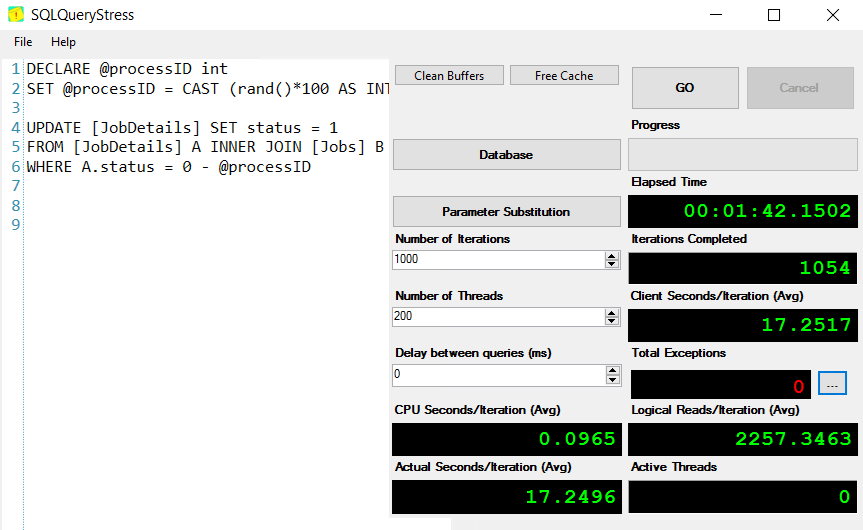
For re-creating the problematic scenario, download SQLQueryStress and run Query Listing:-2 and Query Listing:-3 in two separate SQLQueryStress window for producing artificial load on SQL Server.
SQLQueryStress Window -1
-- Worker Process ID
DECLARE @processID int
SET @processID = CAST (rand()*100 AS INT) + 1

-- Step-1: Book the TOP N jobs
UPDATE TOP (10) [JobDetails] SET status = 0 - @processID
FROM [JobDetails] A INNER JOIN [Jobs] B ON A.job_id = B.job_id
WHERE A.status = 0
AND B.[schedule_time] < GETDATE()

-- Step-2: Select the jobs
SELECT A.[details_id], A.[job_id], A.[details], A.[status]
FROM [JobDetails] A INNER JOIN [Jobs] B ON A.job_id = B.job_id
WHERE A.[status] = 0 - @processID

Query Listing:-2
SQLQueryStress Window -2
-- Worker Process ID
DECLARE @processID int
SET @processID = CAST (rand()*100 AS INT) + 1

UPDATE [JobDetails] SET status = 1
FROM [JobDetails] A INNER JOIN [Jobs] B ON A.job_id = B.job_id
WHERE A.status = 0 - @processID

Query Listing:-3
 |
 |
| Figure:-2 SQLQueryStress Window -1 |
Figure:-3 SQLQueryStress Window - 2 |
After running the above queries, right click on the system_health extended event and click on Watch Live Data. You will see many deadlocks in the system.
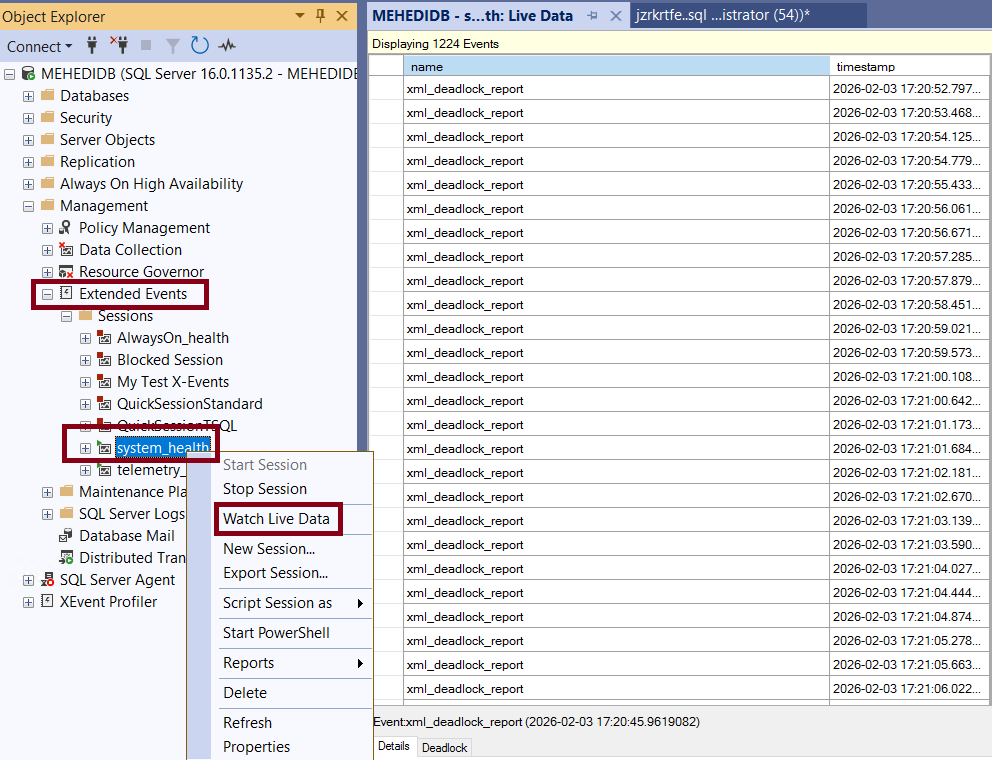
Figure:-4 Monitoring deadlocks
Optimizing the Query
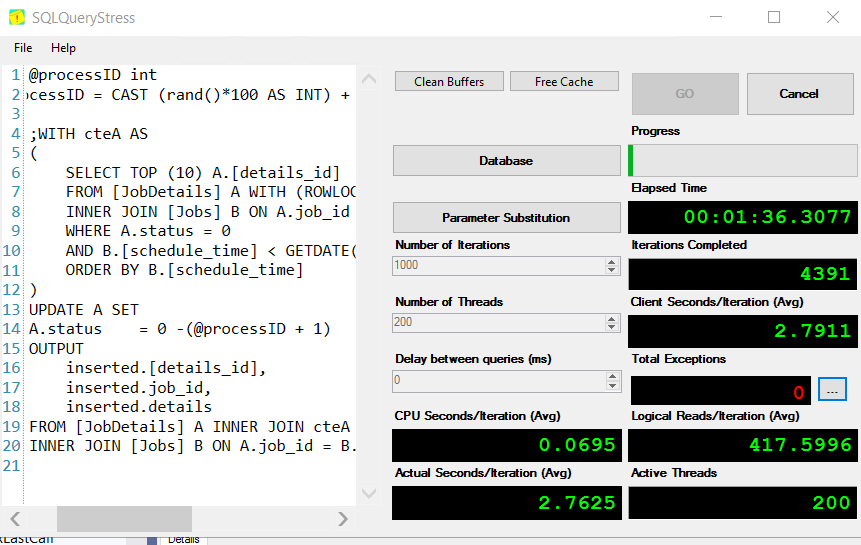
You can optimize the query using a CTE, UPDATE … OUTPUT, and proper locking hints that will eliminate the deadlocks and make the job tables stable and scalable. Now run Query Listing:-4 and Query Listing:-3 in two separate SQLQueryStress windows.
DECLARE @processID int
SET @processID = CAST (rand()*100 AS INT) + 1

;WITH cteA AS
(
	SELECT TOP (10) A.[details_id]
	FROM [JobDetails] A WITH (ROWLOCK, UPDLOCK, READPAST)
	INNER JOIN [Jobs] B ON A.job_id = B.job_id
	WHERE A.status = 0
	AND B.[schedule_time] < GETDATE()
	ORDER BY B.[schedule_time]
)
UPDATE A SET
A.status    = 0 -(@processID + 1)
OUTPUT
	inserted.[details_id],
	inserted.job_id,
	inserted.details
FROM [JobDetails] A INNER JOIN cteA c ON A.[details_id] = c.[details_id]
INNER JOIN [Jobs] B ON A.job_id = B.job_id

Query Listing:-4
 |
|
| Figure:-4 SQLQueryStress Window -1 |
Figure:-5 SQLQueryStress Window - 2 |
This time there is no deadlock event in system_health extended event Figure:-6.
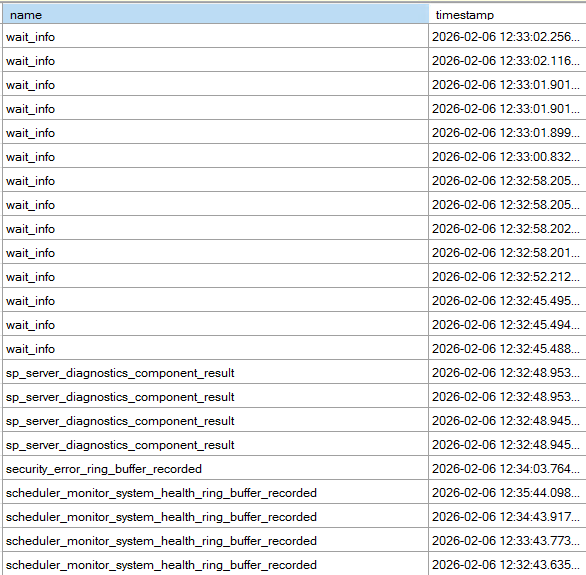
Figure:-4 No deadlocks
What are the roles of locking hints here?
- ROWLOCK - When multiple workers are running this query, it tries to keep locking as granular as possible. Without this lock hint, SQL Server might take page locks. That could block other workers or even escalate to table lock.
- READPAST - If a row is locked by another transaction, skip it instead of waiting. In queue systems, it allows:
- Multiple workers
- No blocking
- No waiting
- Maximum throughput
- UPDLOCK - Takes an Update (U) lock instead of a Shared (S) lock when reading rows. You are selecting TOP 10 rows then updating them. Without UPDLOCK, two sessions could read the same rows then both try to update resulting to deadlock or double processing. With this locking hint,
- First session locks rows
- Second session skips them (because of READPAST)
- No duplicate processing
- This is critical for queue safety.
Final Words
In my scenario, this optimization works superb. If you used this query of faced similar challenges in your system, how did you resolve it? Comment your experience and share your optimization technique.
References
Going Further
If SQL Server is your thing and you enjoy learning real-world tips, tricks, and performance hacks—you are going to love my training sessions too!
Need results fast? I am also available for 1-on-1 consultancy to help you troubleshoot and fix your database performance issues.
Let’s make your SQL Server to take your business Challenge!
For any queries, mail to mamehedi.hasan[at]gmail.com.