Long-running queries are one of the most common causes of SQL Server performance issues. When a query runs for an unusually long time, it can consume excessive CPU, memory, or IO resources and may also block other sessions.
In such situations, quickly identifying the problematic query becomes critical for DBAs. In this series of article on sp_WhoIsActive, we will explore how sp_WhoIsActive can help you to detect long-running queries and understand what they are doing inside SQL Server. Let's start.
Figure-1: Finding Out Long Running Queries
Running Demo Queries
Connect SSMS with the AdventureWorks2022 database. Execute below two queries in two separate windows. These queries are long running queries as
- CROSS JOIN multiplies rows dramatically and
- ORDER BY forces a large sort operation.
-- Query Window-1
SELECT sod.SalesOrderID
    ,sod.ProductID
    ,p.Name
    ,soh.OrderDate
    ,soh.CustomerID
FROM Sales.SalesOrderDetail sod JOIN Sales.SalesOrderHeader soh ON sod.SalesOrderID = soh.SalesOrderID CROSS JOIN Production.Product p
ORDER BY soh.OrderDate DESC

-- Query Window-2
SELECT sod.SalesOrderID
    ,sod.ProductID
    ,sod.OrderQty
    ,sod.UnitPrice
    ,p.Name
    ,p.ProductNumber
FROM Sales.SalesOrderDetail sod CROSS JOIN Production.Product p
ORDER BY p.Name, sod.UnitPrice DESC

Query Snippet-1
Detecting Long Running Queries
Now run sp_WhoIsActive for identifying long running query. You will get output like Figure-2. Some important fields are:
- [dd hh:mm:ss.mss] - Elapsed time i.e. how much time a query has been running
- [sql_text] - Ongoing query commands.
- [query_plan] - Plan of the running query
- [wait_info] - Query's cumulative wait information
- [CPU] - Query's consuming CPU time (in milliseconds).
- [tempdb_allocations] - Total pages allocated for this query in TempDB due to temporary tables, LOB types, spools, or other consumers.
- [tempdb_current] - Current consumption of TempDB pages (Total allocated pages - total deallocated pages) for this query.
- [reads] - Total logical reads (in 8KB pages).
- [writes] - Total logical writes (in 8KB pages).
- [physical_reads] - Total physical reads (in 8KB pages).
- [used_memory] - Total memory (Procedure cache memory + workspace memory grant) used (in 8KB pages).
EXEC sp_WhoIsActive
@sort_order = '[elapsed_time] DESC'

Query Snippet-2

Figure-2: Partial output of sp_WhoIsActive
You can use some parameters which will customize the output for you:
- @sort_order = '[elapsed_time] DESC' – Sorts the output based on the [elapsed_time] field.
- @get_plans = 1 – Shows execution plans for running queries.
- @delta_interval = 5 – Provides how much work the query did in 5 seconds.
- @get_additional_info = 1 – Returns XML snippet with some additional information (Figure-3)
- like transaction_isolation_level, lock_timeout, sql_handle, plan_handle etc.
- @get_locks = 1 – Gives XML snippet regarding lock related info like which table, row, object engaged in blocking. Useful for identifying blocking info.
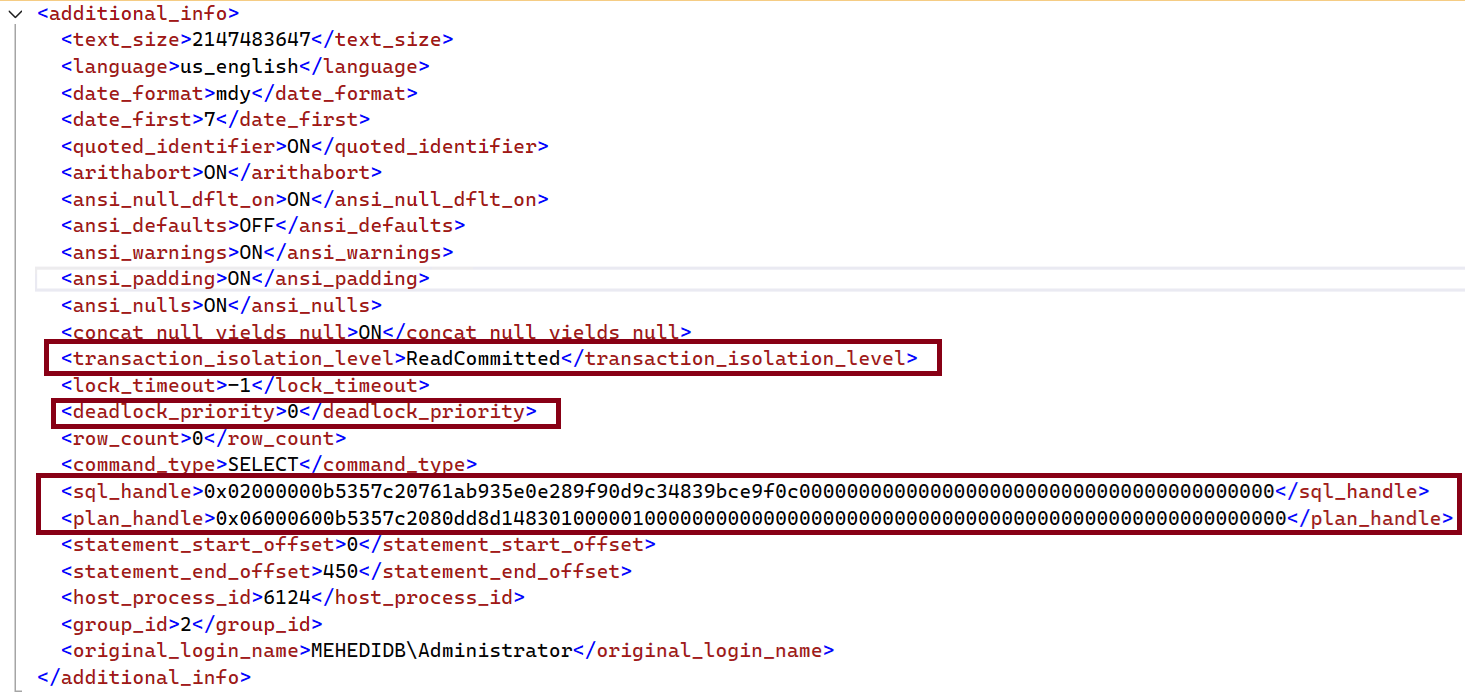
Figure-3: Additional information XML output
Final Words
Identifying long-running queries is a critical step in troubleshooting SQL Server performance issues. Tools like sp_WhoIsActive make this process much easier by providing a clear, real-time view of currently executing sessions and their resource consumption. By quickly spotting queries with high elapsed time, CPU usage, or reads, DBAs can take faster action to investigate and resolve potential bottlenecks. Mastering this simple yet powerful tool can significantly improve your ability to diagnose performance problems in production environments.
References
Going Further
If SQL Server is your thing and you enjoy learning real-world tips, tricks, and performance hacks—you are going to love my training sessions too!
Need results fast? I am also available for 1-on-1 consultancy to help you troubleshoot and fix your database performance issues.
Let’s make your SQL Server to take your business Challenge!
For any queries, mail to mamehedi.hasan[at]gmail.com.