One of the frustrating challenges of a DBA is troubleshooting blocking and locking issues. A single blocked session can quickly escalate and cause widespread performance degradation. Resulting users complaints while the root cause remains hidden. In such situations, having the right tool is critical. In this article, we will explore how sp_WhoIsActive helps you quickly identify blocking chains, understand locking behavior, and take effective action to resolve the issue with confidence.

Figure-2: Troubleshooting Blocking & Locks using sp_WhoIsActive
Locking, Blocking and Deadlocking
- Locking is a mechanism SQL Server uses to protect data integrity when multiple users try to access data simultaneously.
- Blocking occurs when one query holds a lock on a resource, and another query is waiting for that lock to be released. It’s not an error—just a delay caused by one process waiting for another to finish.
- Deadlocking happens when two or more queries block each other in a circular loop. Each process holds a resource the other needs, and neither can proceed, resulting in a standoff. SQL Server detects this and kills one process (called the victim) to break the deadlock.
For more info, check my previous article here.
Features of sp_WhoIsActive
- sp_WhoIsActive provides real-time visibility into blocking sessions, wait types, and lock details, making it easy to quickly identify the root cause of locking issues.
- It helps detect potential deadlocks early by exposing blocking chains and conflicting sessions before they escalate into full deadlock scenarios.
- Easy to identify the top-level blocker or the block leader.
Finding out the Lock Info
Let's open three windows in SSMS and connect with your AdventureWorks2022 database. Execute the same Query Snippet-1 in the two separate windows. The first query will be successful and others will be blocked.
BEGIN TRAN
GO

UPDATE TOP(10) [Purchasing].[PurchaseOrderDetail]
SET OrderQty = OrderQty + 100;


--rollback

Query Snippet - 1
For identifying the blocking chain and block leaders, run sp_WhoIsActive with @get_locks = 1 option (Query Snippet-2). Clicking on the lock column will show locking information in XML format. The XML has (Figure-3):
- One root node per database.
- Database node represents locks in the database.
- Objects node has object subnodes.
- Each object shows lock information grouped by object name and schema name.
- In request_status attribute of each Lock node has value: (Figure-4)
- "GRANT" lock is granted for the session.
- "WAIT" the request is waiting to acquire the lock.
sp_whoIsActive
@get_locks = 1
,@find_block_leaders = 1
,@sort_order = '[blocked_session_count] DESC'

Query Snippet - 2

Figure-2: Output of sp_WhoIsActive
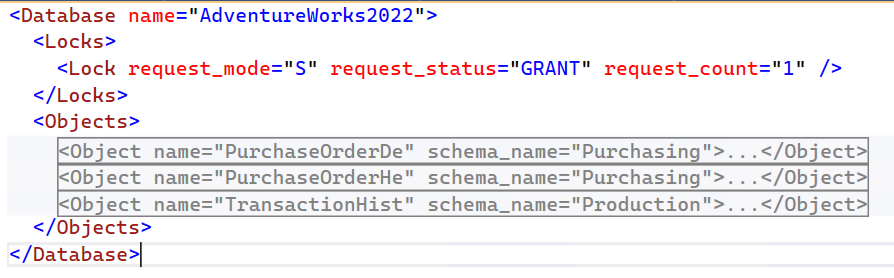
Figure-3: Locking information in XML format
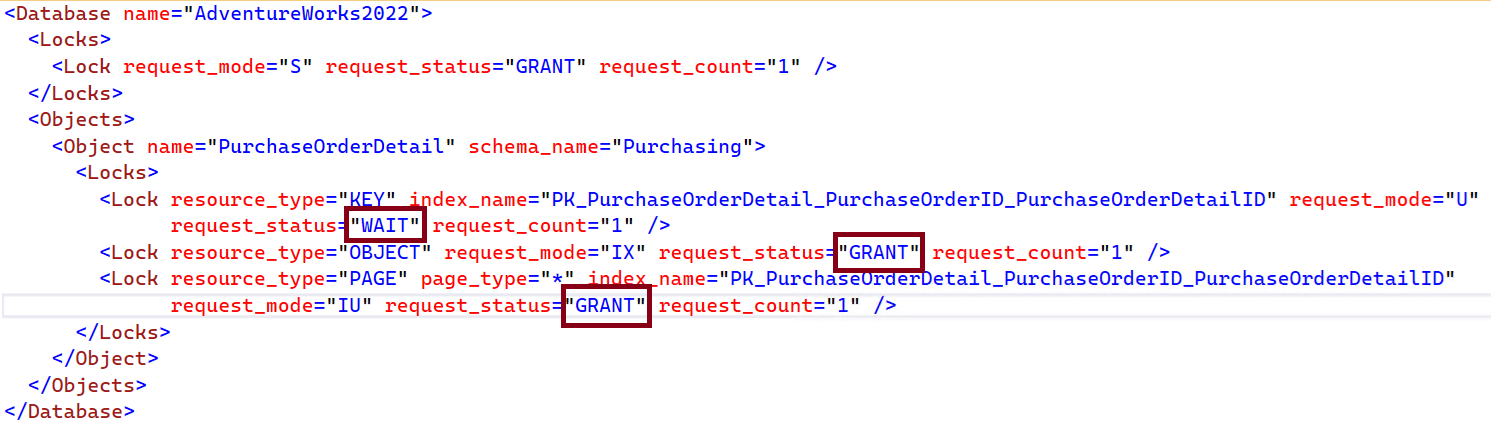 Figure-4: Locking information in XML format with GRANT & WAIT
Leader of the Block
Blocking is typically a hierarchy where one is waiting for other. The leader of the block is the top-level blocker that blocks a resource all others are waiting for it. In Figure-2, the session_id 81 is waiting for 79 and 79 is waiting for 76. The top level blocker is session_id 76. For finding out the leader, run the sp_WhoIsActive with @find_block_leaders = 1 and @sort_order = '[blocked_session_count] DESC' option (Query Snippet-2).
Important Note
@get_locks=1 can affects the query performance negatively. As it retrieves information from the sys.dm_tran_locks which is renowned as one of the slowest DMVs. Use sp_WhoIsActive with @get_task_info = 2 and @get_additional_info = 1.
Final Words
Blocking and deadlocks are inevitable in SQL Server. sp_WhoIsActive empowers a DBA gain real-time visibility into blocking chains, locks, and resource waits, allowing them to quickly identify problematic queries before they escalate. By mastering these techniques, you can minimize downtime, resolve conflicts efficiently, and ensure smoother database performance for your users.
References
Going Further
If SQL Server is your thing and you enjoy learning real-world tips, tricks, and performance hacks—you are going to love my training sessions too!
Need results fast? I am also available for 1-on-1 consultancy to help you troubleshoot and fix your database performance issues.
Let’s make your SQL Server to take your business Challenge!
For any queries, mail to mamehedi.hasan[at]gmail.com.