SQL Server Agent jobs quietly perform many critical tasks, from backups and maintenance to ETL and data synchronization. When one of these jobs fails, the impact can go far beyond SQL Server and affect business operations. The real danger is when a job fails silently and nobody notices until users start experiencing issues. In this article, we will look at common causes of SQL Server job failures and how they can affect your environment. We will also explore practical prevention, monitoring, alerting, and best practices to make sure critical jobs do not fail unnoticed.
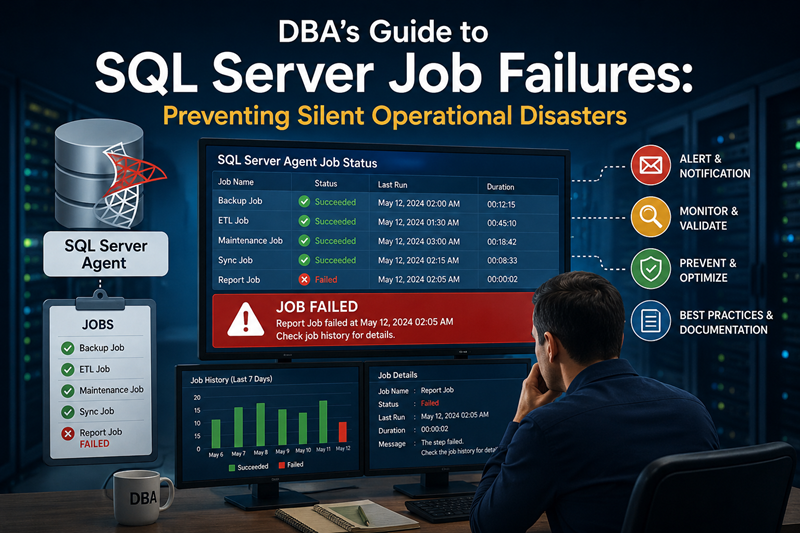
Figure-1: SQL Server Job Failures: Preventing Silent Operational Disasters
SQL Server Agent Jobs
SQL Server Agent jobs are automated tasks in SQL Server that run according to a defined schedule or in response to specific conditions. Like database backups, index maintenance, ETL, data cleanup, archival, synchronization, sending reports/notifications and executing stored procedures or T-SQL scripts.
Why Jobs Fail
A agent job may fail for different reasons. Some common causes are:
- SQL/Database
- Blocking
- Deadlocks
- Query timeout
- Insufficient resources
- Permission problems
- Database unavailable
- Transaction log full
- TempDB issues
- Infrastructure
- Disk full
- Network failure
- Server restart
- Service unavailable
- Storage problems
- Memory issue
- Job/design problems
- Hard-coded paths
- Expired credentials
- Incorrect dependencies
- Bad error handling
- Unexpected data
- Long-running queries
- Job step succeeds even though the actual operation failed
Why SQL Server Jobs Failures Matter
Agent jobs automates different administrative and business tasks like db backup, index maintenance, ETL, report generation etc. An unnoticed failed job will disrupt the system. Like:
- Failed database backups leads to recovery risk
- Failed ETL appears as stale/incomplete data
- Failed data synchronization makes systems inconsistent
- Failed indexes/statistics maintenance deteriorates performance gradually
- Failed purge/archive jobs causes unexpected db growth
- Failed reporting jobs show old data in business report
- Failed monitoring jobs hide administrative and business problems
- Failed replication-related jobs stop disseminating data to downstream systems
Identifying SQL Server Jobs Status
Below query will display all the jobs, their current execution status, last run time, and last run outcome.
USE msdb;
GO

SELECT
    j.name AS JobName,
    CASE
        WHEN ja.start_execution_date IS NOT NULL
             AND ja.stop_execution_date IS NULL
            THEN 'Running'
        ELSE 'Not Running'
    END AS CurrentStatus,
    CASE
        WHEN h.run_status = 0 THEN 'Failed'
        WHEN h.run_status = 1 THEN 'Succeeded'
        WHEN h.run_status = 2 THEN 'Retry'
        WHEN h.run_status = 3 THEN 'Canceled'
        WHEN h.run_status = 4 THEN 'In Progress'
        ELSE 'No History'
    END AS LastRunStatus,
    msdb.dbo.agent_datetime(
        h.run_date, h.run_time
    ) AS LastRunDateTime,
    h.run_duration AS LastRunDuration,
	CASE WHEN j.enabled = 0 THEN 'Disabled' ELSE 'Enabled' END AS Status
FROM dbo.sysjobs AS j
LEFT JOIN dbo.sysjobactivity AS ja
    ON j.job_id = ja.job_id
    AND ja.session_id = (
        SELECT MAX(session_id)
        FROM dbo.syssessions
    )
LEFT JOIN dbo.sysjobhistory AS h
    ON j.job_id = h.job_id
    AND h.instance_id = (
        SELECT MAX(h2.instance_id)
        FROM dbo.sysjobhistory AS h2
        WHERE h2.job_id = j.job_id
          AND h2.step_id = 0
    )
ORDER BY
    CASE
        WHEN ja.start_execution_date IS NOT NULL
             AND ja.stop_execution_date IS NULL
            THEN 0
        ELSE 1
    END,
    j.name;
GO
Some Common Scenarios about Agent Job Failure
- Backup job fails mainly due to disk related issue.
- Sometimes, ETL job succeeds but processes zero rows.
- Maintenance job takes 6 hours instead of 30 minutes.
- Notification fails along with the original job.
- A job owner leaves the organization and the job becomes unmanaged.
- A job fails repeatedly but nobody reviews the history.
Best Practices to Prevent SQL Server Agent Job Failures
- Job Notifications - Always configure email or other alerts for critical job failures so the DBA/team knows immediately.
- Use Retry Attempts Wisely - For temporary network or resource issues, configure appropriate retry attempts before declaring the job failed.
- Handle Errors Properly in T-SQL - Use TRY...CATCH, proper error handling, and appropriate THROW statements so SQL Server Agent can correctly identify a failed operation.
- Monitor Job Duration - A job that normally takes 10 minutes but suddenly takes 2 hours may indicate a problem even if it eventually succeeds.
- Avoid Hard-Coded Dependencies - Avoid hard-coded file paths, server names, credentials, and other environment-specific settings where possible.
- Check Disk Space and Other Resources - Many jobs fail because of full disks, insufficient memory, unavailable network locations, or other infrastructure problems. Monitor these dependencies proactively.
- Use Appropriate Job Owners and Credentials - Make sure jobs run under appropriate accounts and do not depend on an individual's personal account. Review permissions when servers, databases, or security policies change.
- Control Job Overlap - Make sure a new execution does not start while the previous execution is still running unless concurrent execution is explicitly intended.
- Document Job Dependencies - If Job B depends on Job A, make that dependency explicit. A failed upstream job should not allow downstream processing to continue as if everything were successful.
- Monitor Failed Jobs Regularly - Do not wait for users to report a problem. Review SQL Server Agent history and establish a process for investigating recurring failures.
- Test Failure Scenarios - Periodically test what happens when a backup location is unavailable, a database is inaccessible, a job step fails, or a required resource is missing.
- Review Critical Jobs After Changes - SQL Server upgrades, database migrations, password changes, storage changes, and application deployments can break previously working jobs. Include Agent jobs in your change-management checklist.
- Have an Escalation and Recovery Plan - For critical jobs, document who should be notified, what should be checked, whether the job can safely be restarted, and how to validate the result afterward
- Last but not the least, validate the actual result - Do not rely only on the job showing Success. Validate whether the expected work was actually completed like, expected rows processed, backup created, or files generated.
Final Words
SQL Server Agent jobs may run quietly in the background, but their failures can have a significant impact on database and business operations. A good DBA should not only create and schedule jobs, but also monitor, validate, and prepare for their failures. The goal is simple: do not just make your jobs run, make sure you know when they do not.
References
Going Further
If SQL Server is your thing and you enjoy learning real-world tips, tricks, and performance hacks—you are going to love my training sessions too!
Need results fast? I am also available for 1-on-1 consultancy to help you troubleshoot and fix your database performance issues.
Let’s make your SQL Server to take your business Challenge!
For any queries, mail to mamehedi.hasan[at]gmail.com.